- Published on
Best Monitors Under $150 in 2025: Top 3 144Hz Displays Compared
- Authors
- Name
In the competitive monitor market, finding a high-refresh-rate display under $150 can be challenging. Many budget options cut corners on build quality or features. However, we've curated three top-rated monitors that deliver excellent value: the KOORUI 27-inch, Dell 24 Plus, and Dell 27 Plus. All three boast 144Hz refresh rates, FHD resolution, and average ratings of 4.5 stars on Amazon. This guide will help you choose the best fit for your gaming or productivity setup.
| Specification | KOORUI 27 Inch | Dell 24 Plus (S2425HSM) | Dell 27 Plus (S2725HSM) |
|---|---|---|---|
| Price | $109.99 | $149.99 | $149.99 |
| Rating | 4.5 | 4.5 | 4.5 |
| Screen Size | 27-inch | 23.8-inch | 27-inch |
| Resolution | 1920x1080 (FHD) | 1920x1080 (FHD) | 1920x1080 (FHD) |
| Refresh Rate | 144Hz | 144Hz | 144Hz |
| Response Time | Not specified | 1ms (MPRT) | 1ms (MPRT) |
| Panel Type | VA | Not specified (likely IPS) | Not specified (likely IPS) |
| Contrast Ratio | 4000:1 | Not specified | Not specified |
| Speakers | None | 2 x 3W | 2 x 3W |
| Adjustability | Tilt only | Height, tilt, pivot, swivel | Height, tilt, pivot, swivel |
| VESA Mount | Yes (100x100mm) | Yes | Yes |
| Connectivity | HDMI, VGA | HDMI | HDMI |
| Special Features | FreeSync, TUV Rheinland Eye Care | FreeSync | FreeSync |
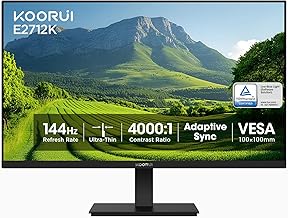
Rank 1: KOORUI 27 Inch Gaming Office Monitor
Detailed Specification
The KOORUI 27-inch monitor features a VA panel with a 4000:1 contrast ratio, delivering deep blacks and vibrant colors ideal for both gaming and office work. Its 144Hz refresh rate ensures smooth motion, and AMD FreeSync support reduces screen tearing. The display is TUV Rheinland certified for low blue light and flicker-free performance, reducing eye strain during long sessions. Connectivity includes HDMI and VGA ports. The monitor has slim bezels for a multi-monitor setup and supports VESA mounting (100x100mm). However, ergonomic adjustments are limited to tilt only. Dimensions are approximately 24.2 x 17.7 x 7.5 inches with stand, and weight is around 11.5 pounds.
Why We Recommend It
At $109.99, the KOORUI offers the best value for a 27-inch 144Hz monitor. Its high contrast ratio and eye care certification make it suitable for both gaming and productivity. The price is significantly lower than the Dell alternatives while still delivering core features.
Pros and Cons
- Pros: Affordable price; large 27-inch screen; high 4000:1 contrast ratio; TUV Rheinland eye care; VESA mount compatible.
- Cons: Limited ergonomic adjustments (tilt only); no built-in speakers; response time not specified; VGA port instead of DisplayPort.
Check Price and Details on Amazon

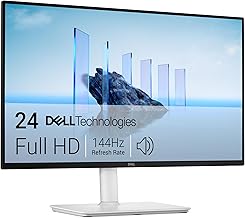
Rank 2: Dell 24 Plus Monitor - S2425HSM
Detailed Specification
The Dell 24 Plus is a 23.8-inch FHD monitor with a 144Hz refresh rate and 1ms MPRT response time, ensuring fluid gameplay. It features built-in 2 x 3W speakers, eliminating the need for external audio. The stand offers full ergonomic adjustability: height, tilt, pivot, and swivel, allowing users to find the perfect viewing angle. Connectivity includes HDMI ports. AMD FreeSync support synchronizes the refresh rate with compatible GPUs to minimize stutter. The monitor has a sleek ash white finish. Dimensions are approximately 21.2 x 15.6 x 7.1 inches with stand, and weight is around 10.5 pounds.
Why We Recommend It
The Dell 24 Plus excels in ergonomics and build quality. Its full adjustability and built-in speakers make it a versatile choice for both gaming and office use. Dell's reputation for reliability and customer support adds peace of mind.
Pros and Cons
- Pros: Excellent ergonomic adjustability; built-in 2x3W speakers; 1ms response time; trusted brand; VESA compatible.
- Cons: Smaller 23.8-inch screen compared to 27-inch options; same price as the larger Dell 27 Plus but smaller size; no DisplayPort.
Check Price and Details on Amazon
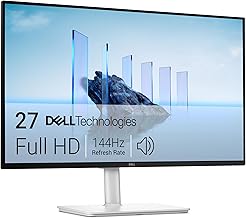
Rank 3: Dell 27 Plus Monitor - S2725HSM
Detailed Specification
The Dell 27 Plus is the larger sibling of the S2425HSM, featuring a 27-inch FHD display with 144Hz refresh rate and 1ms MPRT response time. It includes built-in 2 x 3W speakers and a fully adjustable stand (height, tilt, pivot, swivel). Connectivity is via HDMI. AMD FreeSync is supported for tear-free gaming. The ash white design matches modern setups. Dimensions are approximately 24.2 x 17.7 x 7.5 inches with stand, and weight is around 13.5 pounds.
Why We Recommend It
This monitor combines Dell's premium ergonomics with a larger 27-inch screen, offering the best of both worlds. For users who prioritize adjustability and screen size, this is the top choice within the budget.
Pros and Cons
- Pros: Large 27-inch screen; full ergonomic adjustability; built-in speakers; 1ms response time; reputable brand.
- Cons: Same price as the 24-inch Dell but no extra features; lower pixel density due to 1080p on 27 inches; no DisplayPort.
Check Price and Details on Amazon
Conclusion
Choosing the best monitor under $150 depends on your priorities. If you want the largest screen at the lowest price, the KOORUI 27-inch is unbeatable at $109.99. For a compact, fully adjustable monitor with speakers, the Dell 24 Plus is ideal. If you need both size and ergonomics, the Dell 27 Plus is the premium pick. All three deliver smooth 144Hz performance and high ratings, ensuring a great experience for gaming and productivity.